Revenue scenarios
One operating system for the moments where relationships become revenue.
FanLTV does not apply one sales script to every fan. It connects conversation state, memory, content, prices, purchases, platform events, and human control to choose the right next action.
The shared decision path
Generation is the last step, not the first.
Every revenue workflow follows the same accountable sequence. Provider-specific rules and safety checks stay visible throughout it.
- 01 / SignalWhat just changed?A message, purchase, tip, unlock, follow, like, online event, or period of silence enters the system.
- 02 / ContextWhat do we know?Fan history, model voice, prior purchases, content, budget, promises, relationship state, and channel rules are assembled.
- 03 / DecisionWhat should happen now?Talk, wait, flirt, presell, negotiate, attach content, thank, reactivate, or hand the moment to a person.
- 04 / OutcomeWhat did it change?Delivery, payment, reply, refusal, safety status, and the next relationship state return to the same timeline.
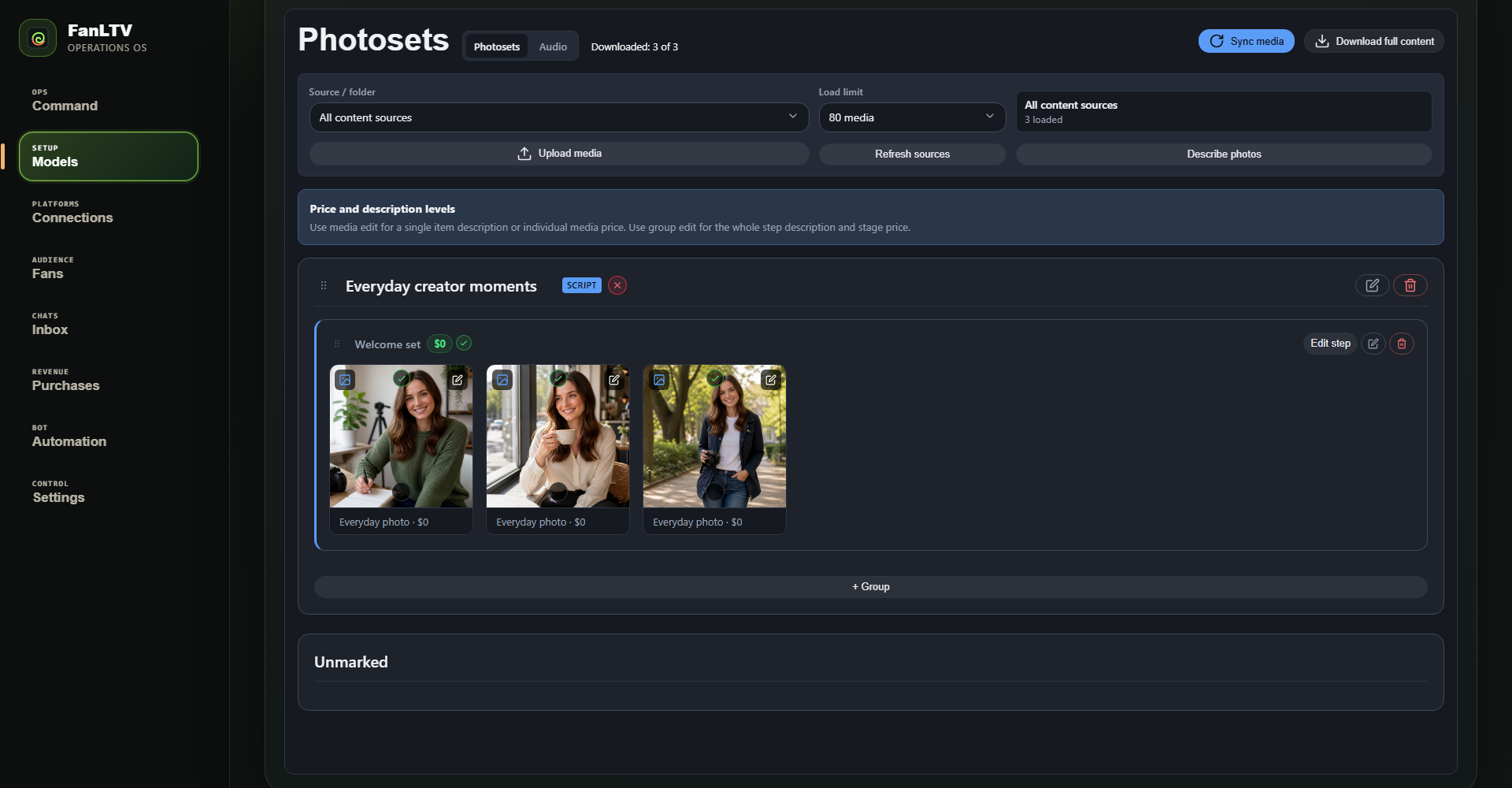
Content commerce workspace
The bot sells from structured inventory, not filenames.
Operators can see the script, step, price, description, preview, and approval state that inform each content decision.
Explore the operating platformPPV & content bundles
Sell the next relevant step, not a random locked file.
Photosets, videos, and scripted sequences become a contextual catalog the conversation can understand.
The fan asks for more, names a preference, reacts to a preview, or shows a budget.
FanLTV separates curiosity, content readiness, and actual purchase readiness instead of treating every explicit message as a checkout signal.
- Previously purchased and already sent media
- Per-media and per-step descriptions, previews, lock state, and price
- The current script step, fan preference, stated budget, and cooldown
Presell, choose a matching asset or bundle, state the contents clearly, and attach the correct paid step.
Free previews can support the sale. Paid steps advance only after the recorded unlock, preventing the next item from being sent for free.
Price floors, step-level prices, per-media prices, duplicate prevention, offer cooldowns, and manual approval remain configurable per model.
Custom content
Turn an open-ended request into a scoped, paid production job.
Customs need discovery, boundaries, pricing, a deposit, and follow-through. A charming reply alone is not enough.
Clarify format, duration, concept, must-have details, deadline, and hard boundaries.
The route can stay in the fan's chosen role-play while still making scope and payment unambiguous.
- Base rate by video minute or asset type
- Configurable markups for name use, complexity, exclusivity, and urgency
- Props, clothing, travel, or unusual production costs quoted separately
- Minimum, target, and maximum negotiation positions
Collect at least the configured deposit before production begins.
The default workflow supports a 50% minimum deposit through an in-platform tip, then records payment confirmation and the remaining balance.
Disallowed requests, ambiguous consent, new production requirements, or pricing outside the configured range can pause automation and route the brief to an operator.
Tips & appreciation
Ask lightly when the fan is already expressing value.
Tips work best as a natural response to a good moment, not as a repeated tax on conversation.
After a fan says the conversation, content, or custom made them feel good.
A model can suggest a coffee, small treat, or thank-you tip in her own voice, while respecting cooldowns and resistance.
Recognize the payment event and acknowledge it directly.
The thank-you can reflect what the fan appreciated, update the relationship state, and preserve continuity into the next conversation.
Tip prompts are suppressed after refusal, during resistance, or when the fan has already supported the model recently. Operators can disable this route per model.
Gifts & wishlists
Make support feel personal without disguising a transaction.
Wishlist language can connect a gift to a real detail in the model's life while staying inside channel rules.
Answer what she likes, what would be useful, or where an approved wishlist lives.
The response draws only from the model's configured facts and approved links rather than inventing an emergency or expense.
- Birthday, travel, home, hobby, or recurring persona detail
- Channel-specific permission to share an external link
- Resistance and recent support history
- No promise of content or access unless the platform permits and records that sale
Wishlist, gift, help, and physical-item routes are individually opt-in. High-risk claims and fulfilment questions move to manual review.
Subscriptions & relationship tiers
Let payment deepen the relationship instead of resetting it.
A follower, subscriber, repeat buyer, and high-value fan should not receive the same pacing or offer path.
Subscription and purchase events become part of fan memory.
The conversation can thank a new subscriber, recognize an existing tier, avoid re-selling access they already have, and adapt intimacy to the actual relationship.
- Follower to first conversation
- Conversation to first purchase
- Buyer to repeat purchase or subscription
- Subscriber to custom, bundle, tip, or renewal
Post-purchase aftercare, remembered preferences, and measured reactivation make the next purchase easier without forcing every good exchange into an immediate offer.
Proactive & reactivation
Return with a reason, not a generic “hey”.
FanLTV can use time, platform events, and previous conversation context to restart a relationship.
- New follower or subscriber
- Like or engagement event
- Fan becomes available online where supported
- Configured silence window after a real conversation
- Campaign or model-specific scheduled condition
Reference an actual shared detail, recent event, unfinished thread, or new content fit.
Reactivation can nurture, flirt, resume a paused sale, or simply reopen the door depending on the fan's history.
Per-model daily caps, cooldowns, deduplication, provider sendability, manual mode, and safety status are checked before enqueue and again before delivery.
Fansly FYP automation
Operate the content loop before the first DM arrives.
FYP publishing can run as a standalone growth workflow, independently from automated chatting.
Upload an archive, organize source clips, and create a reusable campaign.
Each item can carry a hook, caption, hashtags, wall choice, schedule, and lifecycle settings.
- Remove or replace original audio where required
- Apply readable two-color hooks without covering the subject
- Mix creative families and captions instead of repeating one pattern
- Validate duration, aspect ratio, and output before enqueue
Schedule continuously, publish FYP-only when desired, and keep the public wall clean.
Frequency, sleep windows, private wall selection, expiry, retries, and direct/provider transport are campaign settings.
Views, watch time, likes, interaction rate, and downstream conversation signals can be collected at consistent observation windows.
Keep the existing chatter workflow unchanged.
FYP can be the first FanLTV product an agency adopts. See the dedicated FYP workflow
Human control
Automation is useful only while the team can see and stop it.
Every commercial route inherits model mode, agency permissions, safety status, and provider delivery rules.
Manual, assisted, handoff, and full auto remain separate model-level decisions.
Manual keeps writing and delivery with the operator. Assisted requires approval. Handoff pauses eligible automation on an exception. Full auto sends only validated eligible actions.
- Safety or consent uncertainty
- Custom request outside approved boundaries
- High-value or unusual negotiation
- Provider error, duplicate risk, or ambiguous payment state
- Fan explicitly asks for a person
Conversation state, effective mode, funnel events, task status, delivery attempts, and the reason for a handoff remain inspectable for authorized agency users.
Choose the first workflow